
eMaint AI Suite:

AI that speaks maintenance

Maintenance work, minus the extra steps. With eMaint AI, your team can get answers faster, draft SOPs automatically, and log work requests by voice. Get more time where it matters.

4,5 Bewertungssterne

Basierend auf 268+ Bewertungen


Capterra-Logo
Software Beratung Logo
G2-Logo
Gartner Peer Insights Auszeichnung
Benutzer-Symbol

150,000+
BENUTZER

Länder-Symbol

116
LÄNDER

Symbol für Wartungsteams

7,400+
WARTUNGSTEAMS GEHOLFEN

Maschinen festes Symbol

3,4 Millionen
MASCHINEN FIXIERT

We didn’t adapt AI for maintenance.
We built AI from maintenance.

Generic AI tools weren’t built for maintenance workflows, asset history, OEM manuals, or work requests. eMaint AI Suite was. Here’s the difference:
  • Built on your data, not the internet.
    No guesses, no generic output. Your tech gets a torque spec straight from your own OEM manual.

  • Always cited. Always reviewable.
    Every drafted SOP links back to the document it came from, every step of the procedure is ready to review before you approve.
  • Built into the work, not bolted on.
    A spoken work request is logged on the floor — asset, location, problem — without leaving the job.
  • Secure and audit-ready from day one.
    Built for regulated industries, aligned with GDPR and CCPA, with every AI action traceable.
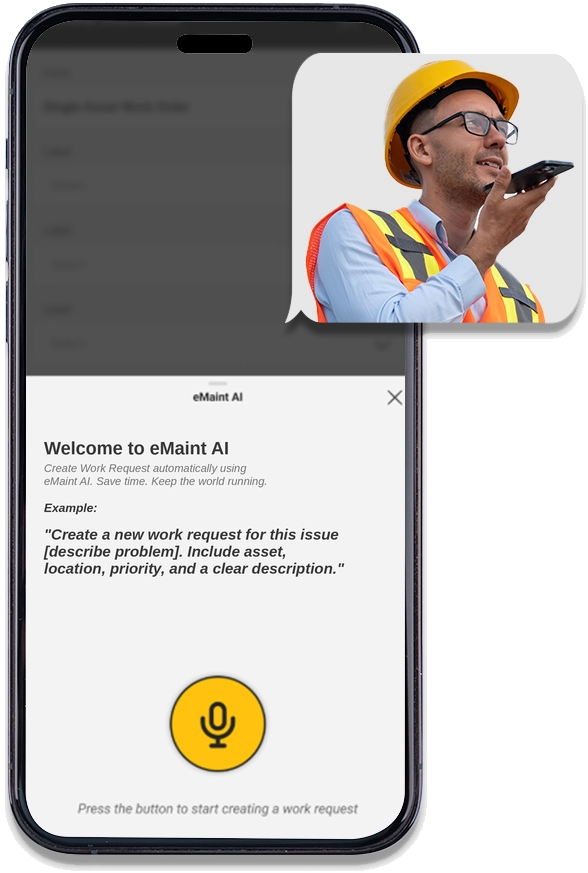
eMaint AI on mobile device

Wir möchten von Ihnen hören: Was ist Ihre größte Herausforderung? Erfahren Sie, wie eMaint helfen kann.

Zitat-Symbol

“With AI being already part of Maintenance at Royal Canin, we are truly excited about the collaborative testing with Fluke on AI embedded in eMaint. Looking ahead with Fluke we see a future with AI-centric solutions designed from Technicians to Technical Managers bringing value across the board.”

Olivier Bruyas, Global Technical Leader Maintenance, Sustainability for Operations, Utilities, Royal Canin

“The AI — that’s huge. I just got off of a call with some of my coworkers and let them know what I found out this week. They’re all pumped”

Phillip Schupp, Reliability Engineer, Mauser Packaging Solutions

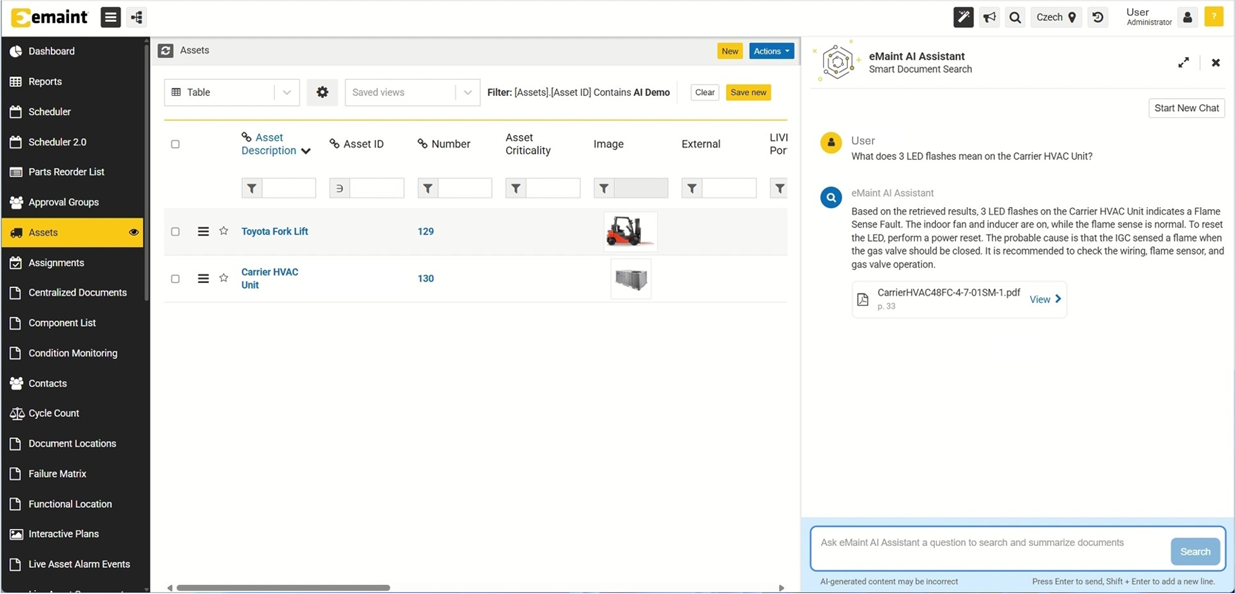
eMaint AI Asset tab screenshot

eMaint AI Assistant:
Your maintenance work day made easier

Your team has questions all day. About a torque spec in a 600-page manual. About last month’s downtime by line. About when an asset was last serviced.

The AI Assistant finds the information you need, pulled from your documentation and data. On desktop or mobile.

eMaint AI Assistant:
Find answers in any document

Find what you need in minutes, not hours. Ask a question about a spec, a procedure or spare part. AI Assistant searches across hundreds or even thousands of documents at once to find the details you need.

From asking around to just asking.

class="img-responsive

Ask in plain language

Skip the search-bar gymnastics. Ask the way you’d ask a senior technician.

“How often should the oil be changed on the Toyota Forklift?”

Icon

Every AI answer is cited

Each response cites the source, like ‘TOYOTA8FGU15MANUAL.pdf, page 42’ so your team can trust the AI response the moment they get it.

Globales Sprachsymbol

Speaks your team’s language

Ask in English. Pull the answer from a manual in German. Or the other way around. The AI works in the language your team works in.

eMaint AI Assistant:
Find answers in your data (in Beta)

Your CMMS/ EAM finally answers back. Get an immediate summarized answer about asset performance, costs, downtime trends, and team workload without spending hours chasing your BI team.

No SQL. No pivot tables. No BI team. Just send the query and get the trend, or the chart.

Erde mit Standort-Pin-Symbol

Understand past failures and fixes quickly

Why does Asset #312 keep failing? When did you last replace the pump on Line 4? AI Assistant pulls the history in one query.

Schwarze Zwischenablage mit einem "x"-Symbol

The pivot table you didn’t have to build

Which assets cost the most. Which repairs keep recurring. Which techs are carrying the load. Get clarity from the data your team already entered.

Symbol für Balkendiagramm-Bericht

Respond faster to leadership questions.

When the VP asks how downtime is trending this quarter, the summarized answer arrives before the meeting moves on. “Let me get back to you on that” is finally over.

Zitat-Symbol

“Part search capability—it’s a huge operational gain.”

Gael Perlet, Business Systems Director, CBRE Scientific Solutions

“You can search a problem on a certain type of machine or a specific machine itself, say ‘I’m having this problem,’ and it’ll search your work order history, give you possible solutions”

Phillip Schupp, Reliability Engineer, Mauser Packaging Solutions

Leverage best practices shaped by Fluke’s years of experience helping global organizations standardize maintenance and scale multi‑site performance..

Download the white paper to access the proven strategies Fluke’s experts use to drive successful multi‑site implementations.

From manual chaos to instant clarity

Mobiltelefon mit Barcode auf dem Bildschirmsymbol

Troubleshoot issues faster

A technician at a downed asset shouldn’t be flipping through a 600-page PDF to find a detail. AI Assistant pulls the right page in minutes.

Symbol

Onboard new technicians faster

New hires get senior-tech-level guidance from Day 1, pulled from the team’s collective knowledge in eMaint. Less ramp-up time. Less downtime. More confident technicians.

Symbol

Reduce reliance on tribal knowledge

Every shift. Every repair. Every lesson. The years of hard-earned expertise your team has built stays accessible, ready for whoever needs it next.

Zitat-Symbol

“It’s quite time-consuming for our engineers to actually find the right part…It’s like let me find that book, note the parts…So [for eMaint AI to do the ] finding stock of a part, the price… it’s brilliant.

Gael Perlet, Business Systems Director, CBRE Scientific Solutions

eMaint AI:
SOP Builder (AI-Driven SOP Generation) (in Beta)

Upload a manual. The draft comes back, structured the way your team writes SOPs. Your senior tech edits. Your team approves. Days of work, done before lunch.

AI assists. AI augments. AI automates. AI never replaces the people doing the work.

Spend 50%+ less time on SOP creation

Erde mit Standort-Pin-Symbol

Save days or even weeks of SOP & PM creation time

Your team uploads the manual. The draft comes back ready to edit. Your senior tech reviews instead of writes.

Schwarze Zwischenablage mit einem "x"-Symbol

One SOP, every site, every shift

The procedure your senior tech approved in Tulsa runs the same way in Tampa. Drafted from the manual your team uploaded and approved.

Symbol für Balkendiagramm-Bericht

Reduce delays caused by limited availability of senior staff

The SOP is already drafted, reviewed, and ready. The next shift doesn’t stall because the senior team is busy.

Zitat-Symbol

“That was super quick… it did it in a few seconds, really—including the scheduled work order. And when it also suggests which task to attach with —that’s brilliant”

Gael Perlet, Business Systems Director, CBRE Scientific Solutions

eMaint AI:
Voice to Work Order (Mobile) (in Beta)

“Bearing running hot on Line 4, high priority.” Your tech speaks one sentence. eMaint AI listens and fills in the right Work Request fields automatically: Asset, Location, Problem, Criticality. Form filled. From there, your
team reviews, approves, and converts the request into a work order.

Maintenance professionals have a lot to say. Now eMaint Mobile listens.

Erde mit Standort-Pin-Symbol

Replace emails, calls, and hallway conversations

“Hey, the chiller on the roof is making a noise” — said out loud, logged automatically, in the workflow your team already uses. No paper. No “I’ll write it up later.”

Schwarze Zwischenablage mit einem "x"-Symbol

Front-door intake for anyone onsite

Operators, supervisors, and contractors all spot issues that need to get logged. Voice to Work Order gives them a fast way to do so, so that nothing slips through the cracks.

Symbol für Balkendiagramm-Bericht

AI understands maintenance context

When a technician says “bearing running hot on Line 4, high priority,” eMaint AI knows bearing is a part, Line 4 is an asset location, and high priority means criticality.

Symbol eines Mobiltelefons mit Checkliste auf dem Bildschirm

Built for busy, mobile environments

Gloved hands, running equipment, and noisy floors mean your team can’t always stop to type. Voice to Work Order doesn’t ask them to.

Zitat-Symbol

“In the lab they’re gloved up… they want to generate a request, so filling in the form without having to type—that’s what we picture. They could interact with it with voice instead of having to leave the lab.”

Gael Perlet, Business Systems Director, CBRE Scientific Solutions

eMaint AI:
Built for trust and security

AI is only as good as the trust you can place in it. The eMaint AI Suite is built for regulated and safety-critical environments, with enterprise-grade security and compliance from day one.

The safeguards your auditors are already asking about are already built in.

Erde mit Standort-Pin-Symbol

Compliant by design

Aligned with GDPR and CCPA. Built to support audit-readiness across regulated industries, from life sciences to manufacturing to facilities management.

Schwarze Zwischenablage mit einem "x"-Symbol

Your data stays yours

Your eMaint AI Suite is trained on your eMaint data. Your data is never used to train models for other customers. It never leaves the security of your system.

Symbol für Balkendiagramm-Bericht

No black box, ever

Every response cites its source, and every drafted procedure can be reviewed and edited. Every AI action is traceable. Your team makes the final call — every time.

The work day your team deserves

Role What changes What it looks like
Techniker Spends the morning fixing assets, not flipping through PDFs Walks up to a downed asset, asks one question, fixes it.
Field tech Logs a problem on the spot, not at the end of the shift Speaks one sentence and the work request is in.
Senior tech Gets to be senior — guiding the team, not writing procedures Spends the day doing the work only they can do.
Supervisor Closes out the day knowing every work request got logged Ends the meeting with the answer the VP asked for.
Reliability manager/planner Pulls the trend they need in one query — not one afternoon Sees patterns no one had time to find before.

One CMMS or EAM. One AI Suite. A new type of work day.

Frequently Asked Questions about eMaint AI

Maintenance AI, sometimes called CMMS/ EAM AI, is artificial intelligence built specifically for maintenance and reliability teams and embedded into a computerized maintenance management system (CMMS) or enterprise asset management (EAM) platform. Unlike general-purpose AI tools, maintenance AI is trained on your own maintenance data: your work orders, asset records, equipment manuals, standard operating procedures (SOPs), and spare parts inventory, so every answer it gives reflects how your team actually works.

A purpose-built maintenance AI helps technicians, planners, and managers do their jobs faster. The right page in a 600-page manual. A draft SOP from an OEM document. The failure history on Asset #312. A work request logged by voice. It does not replace maintenance professionals. It removes the search time, the paperwork, and the back-and-forth that slow them down.

The eMaint AI Suite is a maintenance AI built directly into the eMaint CMMS/EAM, so the AI has full context on your assets, history, and documentation from the moment you turn it on.

The eMaint AI Suite works across the full maintenance day, from intake to execution to reporting:

  • Document search: Ask in plain language. Get an answer pulled from the right page of the right manual, SOP, or work order — cited to the source your team uploaded.
  • Operational data queries: Ask questions about asset performance, downtime trends, repair history, or technician workload without writing SQL or building reports.
  • SOP and PM generation: Turn OEM manuals and asset documentation into draft procedures that the team reviews, edits, and approves.
  • Voice-based work request intake: Operators, technicians, and supervisors log issues by speaking a single sentence, with the AI filling in asset, location, problem, and criticality automatically.
  • Knowledge retention: Capture the years of expertise senior technicians have built up so it stays accessible after they retire or move on.

Every capability above lives inside the eMaint CMMS/EAM workflow, so teams use AI in the tools they already work in. No separate app. No copying and pasting between systems.

Yes. The eMaint AI Suite is built for regulated and safety-critical environments, with enterprise-grade security and compliance from day one.

Your eMaint AI is trained on your eMaint data only. Your data is never used to train models for other customers, and it never leaves the security of your eMaint environment. The platform is aligned with GDPR and CCPA, and built to support audit-readiness across regulated industries including life sciences, manufacturing, and facilities management.

Every AI response cites its source, and every drafted procedure can be reviewed and edited before it’s approved. Every AI action is traceable. Your team always knows why the AI said what it said, and stays in control of every final decision.

ChatGPT and other general-purpose AI tools are trained on the public internet. They can give plausible-sounding answers about maintenance. But those answers are pulled from generic sources — not from your manuals, your assets, or your team’s documented procedures. For a technician at a downed asset, the difference matters.

eMaint AI is different in three ways:

  • It’s trained on your data, not the internet. Every answer comes from your manuals, your work orders, your SOPs, and your asset records.
  • Every answer is cited. Responses include the source document and page number, so your team can verify the answer before acting on it.
  • It’s embedded in your workflow. eMaint AI works inside the eMaint CMMS/EAM, with full context on your assets and history. There’s no copying questions into a separate chatbot or pasting answers back into a work order.

The result: answers that are specific to your equipment, traceable to a source, and safe to use on the plant floor.

The eMaint AI Assistant is the conversational interface for the eMaint AI Suite. Your team asks questions in plain language &mash; by typing or by voice on mobile — and gets answers pulled from your documents and your operational data.

Specifically, the AI Assistant can:

  • Search your documents instantly (Smart Document Search): Your tech asks for a torque spec. The answer comes back from page 142 of the manual your team uploaded — across hundreds or thousands of files at once.
  • Answer questions about your data (Talk to Your Data): Your planner asks why Asset #312 keeps failing. The answer comes back from the work order history your team logged. No SQL. No pivot tables.
  • Work in any language: Ask in English. Get an answer from a manual in German. Or the other way around.
  • Cite every response: Every answer includes the source document and page number. Your team verifies before they act.
  • Work on mobile, hands-free: In the eMaint mobile app, with voice input. Your tech asks at the asset, gloves still on.

Every technician gets the same level of support a senior team member would provide. Every shift. Every asset.

Here’s the typical path:

  • Demo anfordern
  • Connect your existing eMaint data: manuals, SOPs, work orders, and asset records. The eMaint team supports onboarding.
  • Roll out to a pilot group of technicians and planners to validate value before scaling.
  • Expand across sites and teams once the workflow is proven.