
The eMaint Audit Trail tracks changes to work orders, assets, documents, and more, establishing compliance with regulations like the US FDA 21 CFR Part 11.
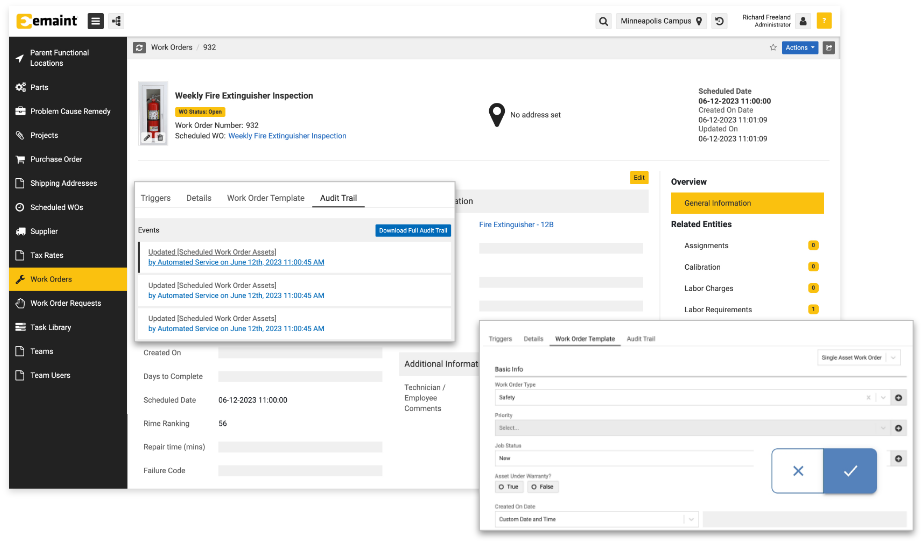
eMaint CMMS equips reliability and maintenance professionals with a key tool for compliance: the Audit Trail.
Make a change to anything in eMaint, from the availability of a centrifuge to the email of a vendor, and eMaint will record it: who made the change, when, and what was changed. You can view these changes in the Audit Trail tab, available in most entities.
Here, you can explore the full history of an item from creation to recent events. You have access to a traceable lineage of edits, status updates, and electronic signatures that serves as a maintenance manager’s ultimate changelog.
Read on to learn how eMaint’s Audit Trail is your partner for tracking & compliance, potentially saving your company hundreds of hours of labor and millions in conserved capital.
“Before we implemented eMaint, we scrambled to find documentation during customer and third-party audits. Now, our auditors and quality control team are very happy ‘customers.’” – Silver Spring Foods
The eMaint Audit Trail: Why eMaint is the Leading CMMS for Audit Tracking
eMaint simplifies regulatory compliance. We designed eMaint’s Audit Trail with highly regulated industries like life sciences and food & beverage manufacturing in mind. eMaint’s Audit Trail is deeply integrated into how the CMMS works, giving users the power to customize everything from who can view the Audit Trail to what types of actions ask for electronic signatures.
Here’s why eMaint leads the CMMS market in compliance tracking.
Require Electronic Signatures: eMaint allows admins to require electronic signatures compliant with FDA and other digital signature regulations. Admins can choose who signatures are required for, when they’re required, and whether to accompany the signature with a reason code or description.
Track Work in the Field: Your team can make changes on the go with Fluke Mobile, the eMaint app, and have them reflected in real time. Going offline? Not a problem. Continue working and, when network access is available, the Audit Trail will reflect the actual time of changes, rather than the time of synchronization.
Advanced Audit-Tracking Features: Enter data uploaded manually, via spreadsheet, or through an API. Record specialized transactions and events. Develop workflows and see automatic changes tracked in the audit trail.
Why Electronic Signatures are Essential for Highly Regulated Industries
To maintenance and reliability professionals in highly regulated industries concerned with food safety and pharmaceutical controls, electronic signatures are essential for demonstrating that production processes have a high integrity and achieving regulatory compliance.
Food can spoil and pharmaceuticals can be contaminated. Having electronic signatures, protected by passwords, ensures that a signature from authorized personnel is required to perform specific actions.
eMaint’s electronic signature system is designed to meet the regulations that govern digital signaturing — meaning that users can rely on the Audit Trail to be compliant with the following regulations and more. Failure to comply with these regulations can result in operational shutdowns that sacrifice invaluable production time.
USA FDA 21 CFR Part 11
The United States Food and Drug Administration governs the production of pharmaceuticals, life science products, and more. Factories that produce these goods need to adhere to FDA Title 21 CFR Part 11, a policy that outlines the FDA’s standards for electronic recordkeeping. The regulation describes how electronic records should be logged, traced, stored, and validated.
The FDA requires the following of companies that fall under 21 CFR Part 11:
- Validation of Controls and Procedures
- Internal systems should be accurate, reliable, and consistent
- Establishment of an Audit Trail
- Manufacturers must provide precise, complete, and time-stamped records gathered during normal operation
- Meet Requirements for Electronic Signatures
- Signatures need the name, date/time, and a “reviewed” or “approved by” indicator
- Preserve Complete and Accurate Copies of Inspection Results
- Accurate and complete copies of files in question should be stored in multiple formats in a secure system
EudraLex Volume 4
European manufacturers look to EudraLex Volume 4 for good manufacturing practices, and for guidance on e-signature compliance, EudraLex Volume 4, Annex 11: Computerized Systems.
EudraLex regulations call for similar processes and controls to FDA Title 21 CFR Part 11, including data security, audit trails, and electronic signatures linked to their respective records with date and time stamps.
Good Manufacturing Practices (GMP) and Good Laboratory Practices (GLP) Guidelines
Manufacturers in the US should follow Good Manufacturing Practices and Good Laboratory Processes, which streamline FDA approval and accelerate the compliance process. An audit trail, especially one with the detail and e-signature security that eMaint provides, is essential to establishing compliance with GMP and GLP guidelines in preparation for an audit.
How the eMaint Audit Trail Gives You Control Over the Electronic Signature Process
eMaint safeguards your maintenance data by giving admins the ability to require e-signatures for specific actions.
Users must enter a password to sign off on actions, protecting the integrity of your audit trail while a user is away from the keyboard or working with highly regulated substances like medical devices or pharmaceuticals.
Specifically, Admins can choose which events—from approving work orders to changing the status of life science assets—require signatures by following these steps.
How To Require E-Signatures with eMaint
- Go to Account Settings by clicking on in the top right of your screen
- Click into Entities
- Choose an Entity (example: Asset Parts)
- Navigate to the Fields tab
- Select a field that you want to require an electronic signature for users to update
- Looking at the field’s settings on the left, you will see a box, Requires E-Signature
- Check this box to require an electronic signature
What if you want to know why a User performed a certain action—what reason did they have for, say, delaying a predictive maintenance task on vital technology that keeps test samples at the right temperature for a Life Sciences application?
eMaint gives Admins the power to choose whether to require a Reason Code, a broad category for the reason, and Reason Text for giving specific explanations.
You can customize your e-signatures to display and/or require a reason code, text field, or neither.
How To Require Reason Code and Reason Text for E-Signatures
- First, you’ll need to create a Reason Code if you want to require one: go to Account Settings by clicking on in the top right of your screen
- Go to References, then Audit Reason Code, and create your reasons
- Click into E-Signature
- Toggle the sliders to choose whether to Display and/or Require the Reason Code or Reason Text
Once you choose your settings for electronic signatures and Reason codes and descriptions, you can experiment with making a change that requires a signature.
A window will pop up: Authorization Required, asking you for your password and reason data.
Now click into the Work Order, Asset, Part, or other record you changed. Going to the Audit Trail located under the Other tab on the right side of the screen, you will then be able to view your change in the Events pane on the left.
Here you can explore the changes made to the record and see your e-signatures and their reason fields.
How the Audit Trail Works
The eMaint Audit Trail tracks all changes made by users, establishing a lineage of Events you can view by clicking Audit Trail under the Other tab of a record.
You will see Events displayed in chronological order on the left of the screen and details displayed on the right.
Work order assignments, the repair status of assets, and documents added to projects alike are all included as records. The eMaint Audit Trail will also track specialized information like transactions.
What the Audit Trail Records
For each record, the Audit Trail tracks the following:
- Description of change made
- Date and time of change
- User who performed the change
- A comparison of old and new values
Methods for Uploading Data
How users wish to enter data is up to them, with eMaint allowing for a variety of methods:
- Manual entry
- Excel spreadsheets
- Data imported through API connection
Example: Work Orders
Here’s an example of how a Work Order approval will appear in the Audit Trail.
- A user creates a work order request
- Their manager approves the request
- Once it is approved, the event will appear in the Audit Trail, populating its title, date & time, who approved it, and the resulting work order number
- If the request is rejected, the Audit Trail will be populated with the title of the request, date & time, who rejected it, and reason listed for rejection
For Admins who wish to control which types of Users see the Audit Trail, click the profile icon at the top right of the screen and then choose Account Settings. From here, click into Roles. Choosing a role you want to restrict, scroll down to Audit Trail, and decide what permissions levels are appropriate.
Tracking Changes On the Go: Audit Tracking with Fluke Mobile
Fluke Mobile is a smartphone app that allows users to use eMaint in the field: check asset meter readings, access Fluke Tools support, look at an updated view of hours on labor changes, all on the go. Users can even receive IOS push notifications for newly assigned Work Orders.
Fluke Mobile works offline, too. The Audit Trail reflects both the actual time and date of updates and the time network access becomes available and the smartphone synchronizes.
Life sciences personnel, and anyone involved in highly regulated manufacturing, can work offline with confidence at 2:00pm, sync changes at 7:00pm, and find accurate timestamps on the Audit Trail immediately afterwards.
eMaint streamlines fieldwork in this way, eliminating audit tracking nightmares and head-scratching over manual audit trail edits later.
Later, auditors looking for complete digital records in compliance with USA FDA 21 CFR Part 11 are satisfied.
How eMaint Simplifies Audits
You may be asking yourself at this point: the features are impressive, but how does eMaint work for me when auditors come knocking?
Navigating to the Audit Trail is an easy-to-use method for demonstrating compliant systems to auditors in just a few clicks. Now your auditors don’t have to go hunting for data or sorting through masses of paperwork thanks to how a CMMS keeps you prepared for audits in advances
Going into a record and selecting the Audit Trail under the Other tab on the left, Users can show the event history to auditors, and if they want access to the full records, Users can click Download Full Audit Trail. Users can also prepare in-depth reports with customizable CMMS reports and dashboards.
How to Streamline Compliance with the eMaint Audit Trail
A factory manager or engineer who knows how to harness the eMaint Audit Trail can save themselves hundreds of hours of troubleshooting and ensure audits are a smooth and streamlined process.
Remember the following key tactics for maximizing your eMaint experience:
- Make your audit trail work for you by customizing who sees it, uploading data via excel or API as needed, and digging deep when you have questions
- Take advantage of the e-signature functionalities to set in place a lasting system for capturing digital signatures, and reason codes/descriptions, for each specific action you require them to
- Let eMaint simplify your audits by navigating to the Audit Trail, downloading it for auditors to review if necessary, and exploring the Dashboards tab for advanced reporting
eMaint’s Audit Trail is just one tool in a broad inventory of award-winning CMMS features from asset management to work orders, condition monitoring, inventory analysis, data visualization and much more, crafted to enhance your production-line performance and save you time and money.
Get in touch with eMaint to learn more.